You'll spot the obviously broken AI image. You won't spot the one with the wrong logo.
When an AI image comes back wrong in an obvious way you delete it and move on, and it costs you nothing. The expensive failure is the take that looks completely finished and has quietly changed something about the product — and it shows up first in exactly the places nobody re-checks. Below is one plan run twice, with only one of the two right.
The question
You upload the product, ask for a different background, and what comes back looks great. The question almost nobody asks at that moment is the only one that matters later: while the background changed, did anything about the product change too? Someone testing background tools put it exactly that way in r/AI_UGC_Marketing on 23 August 2026 —
Did the product stay exactly right while the background changed, or did AI quietly update a few things it decided to improve?
Their worry was specific and commercial: selling a real thing means you cannot have a tool redesigning the packaging in order to make the photo more cinematic. Even in the tool they liked best, they flagged the same caveat — check detailed packaging closely afterwards, because labels and fine print shift in subtle ways.
What the thread told them, and it is the useful part
Two replies, both from people who disclosed they work in this space, and between them they produce a taxonomy that is worth more than any tool comparison:
- There are two kinds of tool and the difference is structural. Some mask the product and generate only around it. Some generate the whole frame and hand the product back to you as a suggestion. The second kind, in the words of one reply, drifts eventually — no concept of an area that's off limits.
- Drift has a signature. When a full frame is regenerated it shows up first in text, logos, stitching and small hardware. Not in the shape of the thing; in the small stuff you stop looking at.
- Regenerating is not a fix. On a whole-frame tool you do not get a corrected label, you get a different wrong label.
- The line runs between listings and ads. One reply treats preservation as a hard requirement for actual listings and masks the product every time — and gives ads and social more latitude, because nobody is comparing a lifestyle shot to what arrives in the box.
Silent drift is the real risk, not the obvious kind.
Where we sit in that taxonomy, since it is not flattering
Swipe60 regenerates the whole frame. It does not mask your product and paint around it. So by the classification above, drift is possible here by construction, and no amount of careful prompting turns that into impossible.
Here is what it actually looks like, from our own library rather than a demo made for the occasion. One plan, written from one reference, run twice against the same photograph of a navy snapback — the same cap that appears everywhere else on this site.
One plan, run twice
Same reference, same product photo, same plan text — character for character. Both at 1K, nothing retouched.
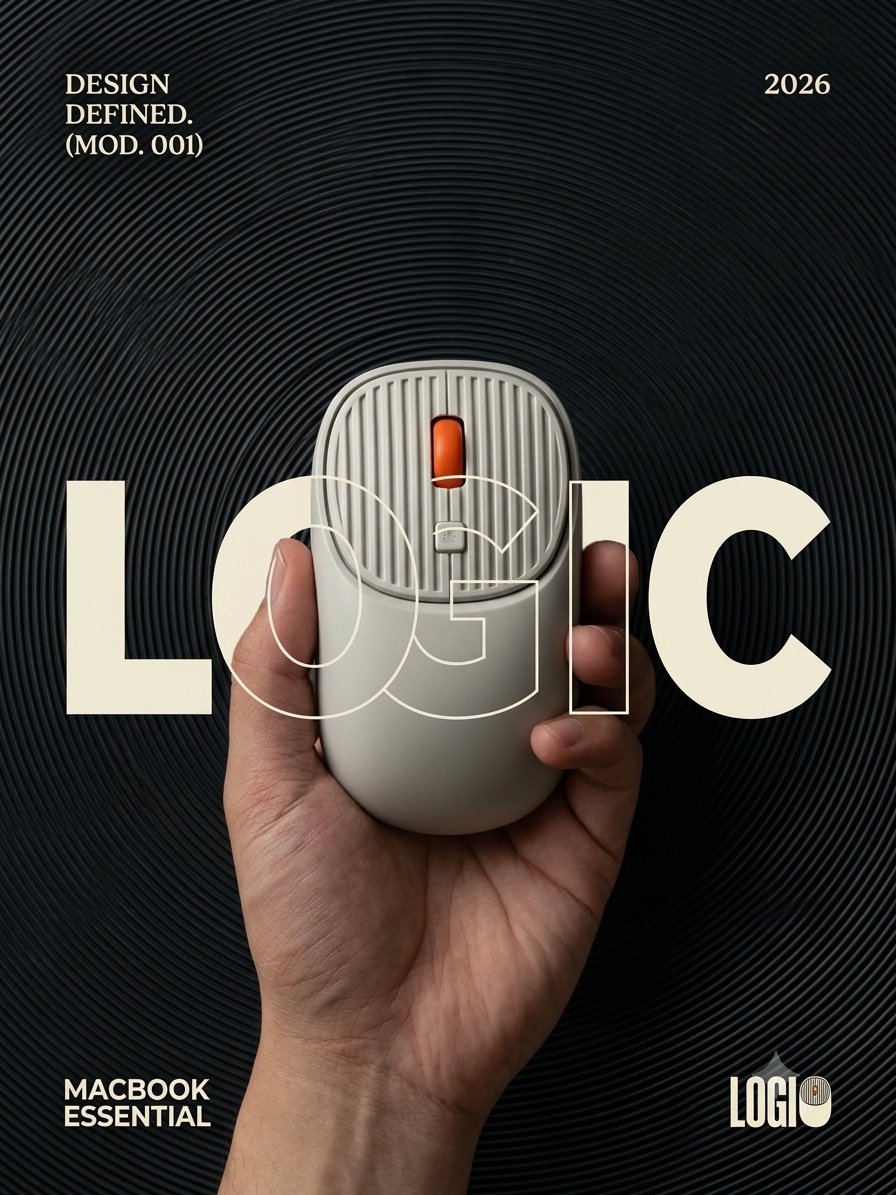
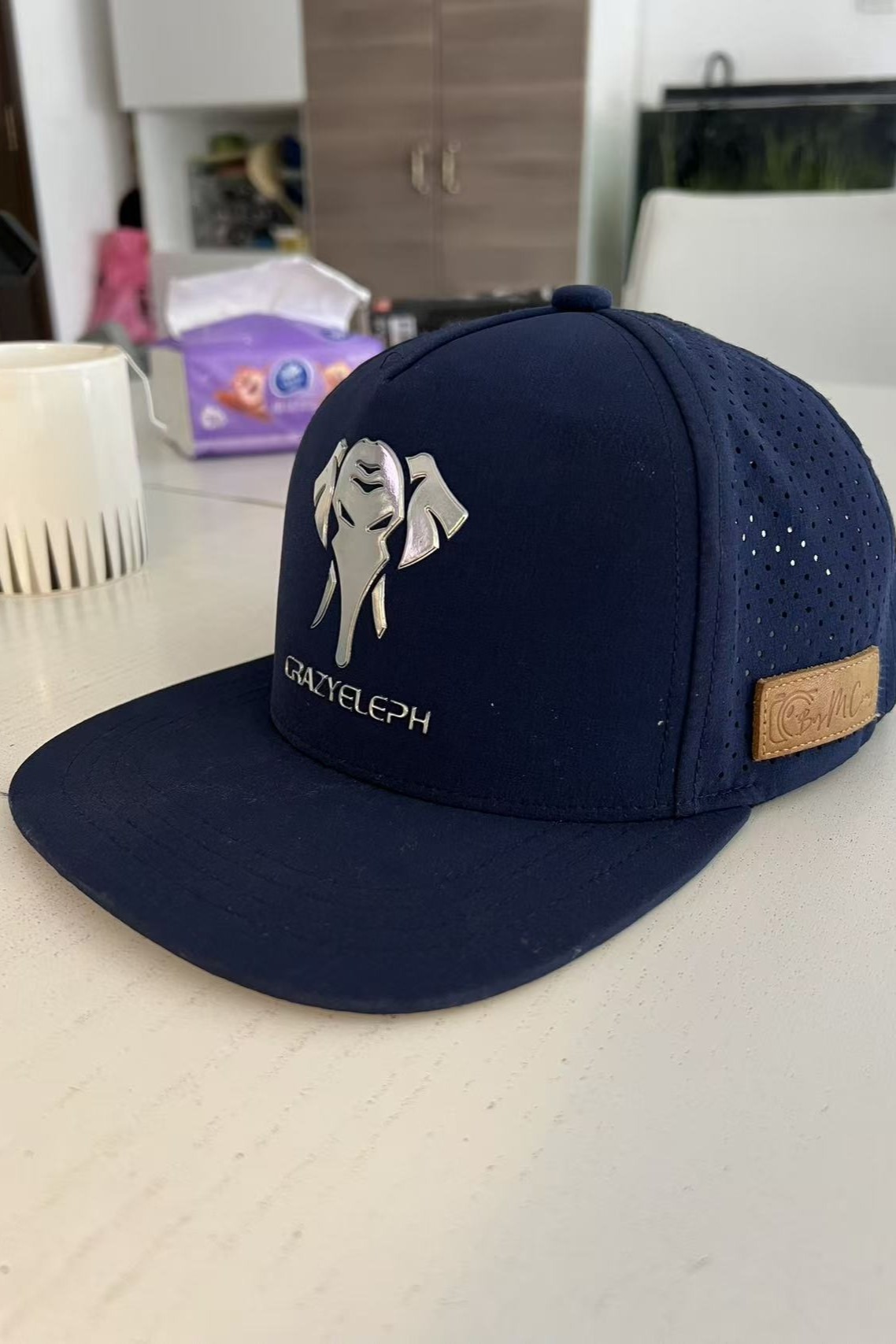
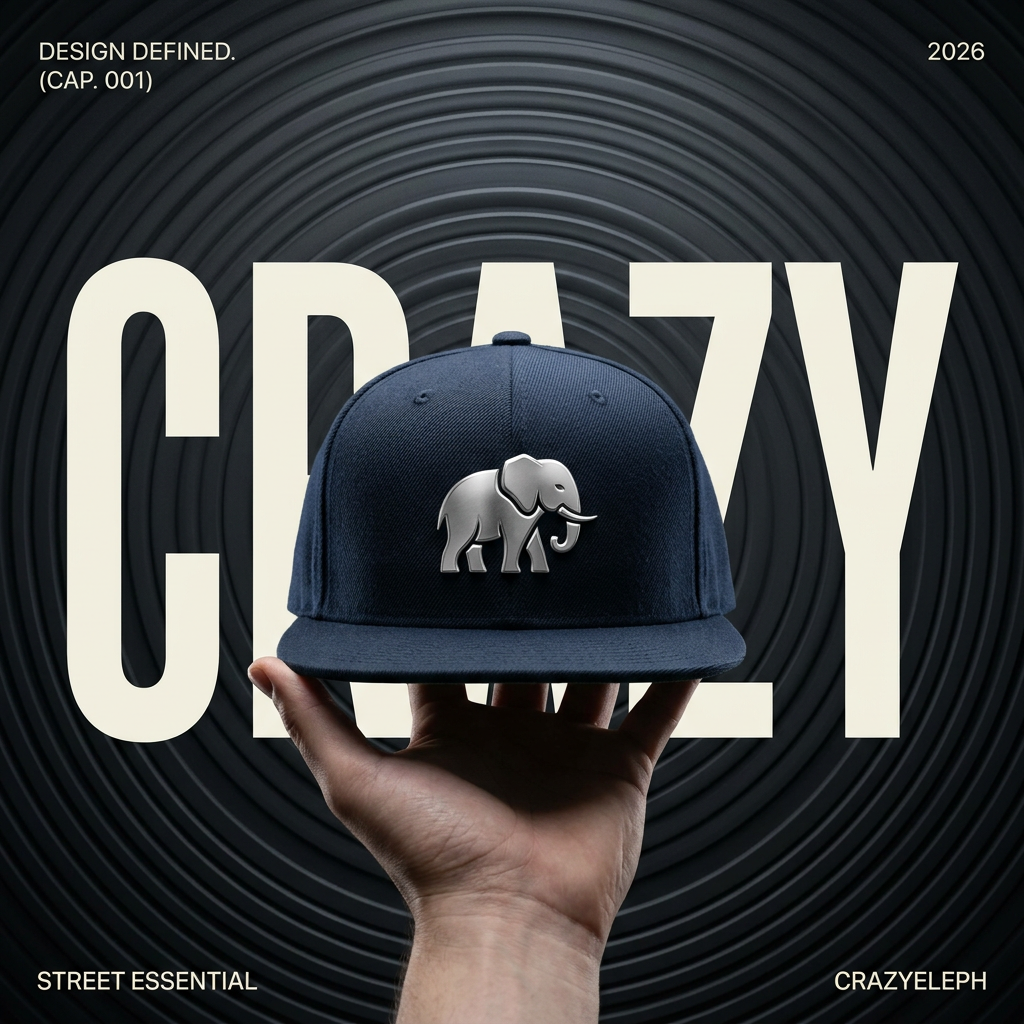

This is the failure mode the thread described, arriving exactly where it was predicted to: a logo. Both images are competent posters. One of them is a poster for a cap that does not exist. And the first take is not "the rough one you throw away" — it is the same quality as the second, which is the whole problem. Try it with your own reference → free · two images a day
So: the rule, and it is not subtle
Do not put a regenerated image on a product page. Not ours, not any whole-frame tool's. The product page is where a customer forms the expectation that the parcel either meets or doesn't, and "not as described" is a return, a refund and a person who now thinks you exaggerate. For listings the reply in that thread is right: mask the product, or photograph it.
Ads and social are a different question, and that is the honest reason this tool exists. A feed image has one job — to be looked at — and nobody is holding it against the box. That is not a loophole; it is a different artefact with a different contract, and it is what Swipe60 is for. Our own homepage says static images for ads and social, and this is why the sentence is worded that way.
Check every take, not the first one. Ten seconds: put your own photo next to the result and count the things that identify the product — the emblem, the wordmark, the stitching, the hardware, the stone count, the closure. Not "does it look right", which is what you do automatically and is worthless here, but count them. A regenerate costs one image, so being wrong is cheap; not looking is what is expensive.
Two free images a day, and a reason to look closely at both.
Bring a reference you like and a phone photo of your product. You get the plan in sentences and the first image from it — and then you do the ten-second count, because the tool cannot do it for you and neither can any other whole-frame generator.
Sources.
- The thread: “Can AI change a product background without changing the product itself?”, r/AI_UGC_Marketing, 23 August 2026, read on 17 September 2026. The composited-versus-regenerated distinction, the drift signature and the listings-versus-ads line are all from the two replies; both repliers disclosed a commercial interest and the page says so.
- The four takes are from our own library, generated 2026, and the two shown share one plan text verified identical character for character. The product photograph is the same cap used elsewhere on this site, shot on a phone.
- Disclosure: I build Swipe60, which regenerates the whole frame and is therefore the kind of tool this page tells you not to use on a product page.